



Typography
max Sans
Max Sans has a distinctive visual voice paired with a custom typeface that feels human and relatable yet premium.
The Max Sans font family is available in Latin, Greek, and Cyrillic character sets.
We work directly with Monotype to manage licensing of our brand fonts:
- External partners, request access by email: fontserveradmins@warnermedia.com
- The requesting email address must be that of an individual and not a distribution list.
- Once approved, you will receive an email from Monotype with setup instructions.
Kk Ll Mm Nn Oo Pp Qq Rr Ss Tt Uu Vv Ww Xx Yy Zz
Kk Ll Mm Nn Oo Pp Qq Rr Ss Tt Uu Vv Ww Xx Yy Zz
Kk Ll Mm Nn Oo Pp Qq Rr Ss Tt Uu Vv Ww Xx Yy Zz
Kk Ll Mm Nn Oo Pp Qq Rr Ss Tt Uu Vv Ww Xx Yy Zz
Kk Ll Mm Nn Oo Pp Qq Rr Ss Tt Uu Vv Ww Xx Yy Zz
Kk Ll Mm Nn Oo Pp Qq Rr Ss Tt Uu Vv Ww Xx Yy Zz
Kk Ll Mm Nn Oo Pp Qq Rr Ss Tt Uu Vv Ww Xx Yy Zz
Kk Ll Mm Nn Oo Pp Qq Rr Ss Tt Uu Vv Ww Xx Yy Zz
Kk Ll Mm Nn Oo Pp Qq Rr Ss Tt Uu Vv Ww Xx Yy Zz
Kk Ll Mm Nn Oo Pp Qq Rr Ss Tt Uu Vv Ww Xx Yy Zz
Kk Ll Mm Nn Oo Pp Qq Rr Ss Tt Uu Vv Ww Xx Yy Zz
Kk Ll Mm Nn Oo Pp Qq Rr Ss Tt Uu Vv Ww Xx Yy Zz
Kk Ll Mm Nn Oo Pp Qq Rr Ss Tt Uu Vv Ww Xx Yy Zz
Kk Ll Mm Nn Oo Pp Qq Rr Ss Tt Uu Vv Ww Xx Yy Zz
Kk Ll Mm Nn Oo Pp Qq Rr Ss Tt Uu Vv Ww Xx Yy Zz
Kk Ll Mm Nn Oo Pp Qq Rr Ss Tt Uu Vv Ww Xx Yy Zz
Noto Sans
For languages that require special letters and characters not found in Max Sans or Inter, use Noto Sans as an alternative.
To preview and download the Noto Sans fonts:
- Go to Google Fonts.
- Select the Language from the dropdown menu.
- Then click on the “Get font” button and “Download all.”
Arabic Example
Request Access
Monotype is available globally for WBD employees to support all creative asset development. Featuring over 30,000 fonts, the collection helps make sharing projects a seamless experience. Monotype is available for download through WBD Self Service. To sync fonts and access using your web browser, please go directly to Monotype.com.
To create a Monotype account and set up web access and syncing, please contact fontserveradmins@warnermedia.com for account creation and to troubleshoot any font-process issues.
Monotype Look-Alike Fonts
When creating projects, vendors and designers should be using our Monotype accounts first and foremost to ensure that the fonts are available.
If the font is not available on the Monotype server, first try to select an alternate font using the similar search function What The Font?, in Monotype, to find a look-alike font.
You can also ask fontserveradmins@warnermedia.com for assistance in finding similar fonts through Monotype.
Enterprise Licensing
If no suitable replacement is found, Originals Marketing (OM) or the creative lead should send a Monday.com request to obtain a Monotype enterprise license.
For instructions on the Monday.com request form, please see the demo video.
If a font can be licensed through Monotype under our enterprise agreement:
- Monotype provides the cost, and OM or the creative lead determines whether to allocate money toward this purchase
If they do not wish to purchase the font through Monotype, they can request a comparable or alternate font from Monotype - If they wish to purchase the font, the OM or creative lead contact will request an enterprise license from Monotype via the Monday.com form
- Monotype will then send an email agreement and include the OM or creative lead contact, fontserveradmins@warnermedia.com, Jennifer Gruber: jennifer.gruber@warnermedia.com, and David Hoisch: david.hoisch@warnerbros.com
- The OM or creative lead contact must add a VP or above (someone responsible for the campaign’s budget) to the email to confirm the purchase
- Once approval is obtained, Monotype will submit an invoice to the OM or creative lead contact and make the font available to WBD users
- The OM or creative lead will review the submitted invoice and send it to Finance
If a font cannot be licensed through Monotype under our enterprise agreement:
- fontserveradmins@warnermedia.com — or OM or the creative lead — reaches out to the font foundry to request a quote for an enterprise license
If the company does not offer enterprise licenses or the font is free, another font will have to be chosen - The EULA and any other information are sent to either OM’s legal contact or the creative lead’s legal contact for review
- If both the cost and EULA are approved, OM or the creative lead will have documentation signed by a VP or above from the team that is paying for the font
- OM or the creative lead forwards the invoice to Finance
- Once the contracts have been signed and payment is worked out, your font admin will obtain the font from the foundry and upload the font to Monotype for use, along with the signed EULA and invoice
- The font server admin uploads the font, assigning access according to the EULA
Legacy Fonts
If you want to use a font from a previous campaign that is not currently in Monotype, you must follow the steps above to purchase an enterprise license. Otherwise, you will need to change the font.
Key Definitions

Monotype font: Fonts that are already available in Monotype
Non-Monotype font: Fonts that are NOT available in Monotype. These fonts require an enterprise license
Modified font: A font (either in Monotype or available through an outside foundry) with letters that have been modified
Custom font: A font designed specifically for your project that contains an entire font set. There is no charge to add this to Monotype; documentation must be provided
Custom typography art: Letters drawn specifically for your title logo that do not contain font files are considered art. No font license is needed
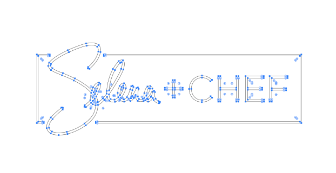
Outlined font: Font becomes a vector image; letters can be modified, but they cannot be edited unless you have that font and can retype the message. Title logos are often outlined fonts. However, they still need to be either a Monotype font or purchased and added to the Monotype library to ensure legal compliance